
 CSS效果-文字
# 菜单hover下划线动画
设置transform-origin属性为left或right、设置过度transition,使用width或transform: scaleX()变化宽度即可实现
<template>
	<div class="top">
		<span class="item">Menu</span>
		<span class="item">Catalogue</span>
		<span class="item">News</span>
		<span class="item">About</span>
	</div>
</template>

<script>
</script>

<style scoped>
	.top {
		display: flex;
		flex-direction: row;
		align-items: center;
		margin: 20px 0;
	}
	.item {
		display: inline-block;
		margin: 10px 10px;
		font-size: 20px;
		color: #333333;
		position: relative;
		cursor: pointer;
	}

	.item::after {
		content: '';
		height: 3px;
		position: absolute;
		bottom: 0;
		left: 0;
		background-color: #0080FF;
		transform-origin: left;
		transition: all .3s;
		/* width: 0; */
		width: 100%;
		transform: scaleX(0);
	}

	.item:hover::after {
		/* width: 100%; 使用width变化视觉上有残留*/
		transform: scaleX(1);
	}
</style>
1
2
3
4
5
6
7
8
9
10
11
12
13
14
15
16
17
18
19
20
21
22
23
24
25
26
27
28
29
30
31
32
33
34
35
36
37
38
39
40
41
42
43
44
45
46
47
48
2
3
4
5
6
7
8
9
10
11
12
13
14
15
16
17
18
19
20
21
22
23
24
25
26
27
28
29
30
31
32
33
34
35
36
37
38
39
40
41
42
43
44
45
46
47
48
# 文字图片镂空
利用color: transparent和background-clip: text,将背景图裁剪到透明文字内容上

.text-clip {
	width: 300px;
	/* height: 200px; */
	background-image: url(../../assets/bg2.jpg);
	background-size: cover;
	font-size: 40px;
	color: #FFFFFF;
	text-align: center;
	font-weight: bolder;
	/* 颜色透明加背景显示在内容下 */
	color: transparent;
	background-clip: text;
}
1
2
3
4
5
6
7
8
9
10
11
12
13
2
3
4
5
6
7
8
9
10
11
12
13
# 文字渐变动画
在图片镂空的基础上借助animation动画实现文字渐变动画
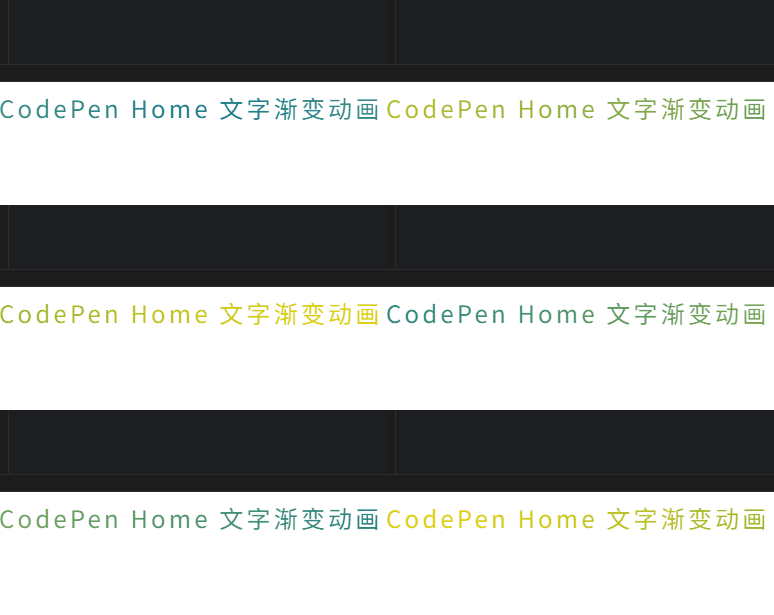
.word-color {
  letter-spacing: 0.2rem;
  font-size: 1.5rem;
  background-image: -webkit-linear-gradient(left, #147B96, #E6D205 25%, #147B96 50%, #E6D205 75%, #147B96);
  -webkit-text-fill-color: transparent;
  -webkit-background-clip: text;
  -webkit-background-size: 200% 100%;
  -webkit-animation: maskedAnimation 4s infinite linear;
}


@keyframes maskedAnimation {
 0% {
  background-position: 0 0;
 }

 100% {
  background-position: -100% 0;
 }
}
1
2
3
4
5
6
7
8
9
10
11
12
13
14
15
16
17
18
19
20
2
3
4
5
6
7
8
9
10
11
12
13
14
15
16
17
18
19
20
# 文字倾斜阴影
.text-italic {
	width: 300px;
	/* height: 200px; */
	font-size: 40px;
	text-align: center;
	font-weight: bolder;
	/* 颜色透明加背景显示在内容下 */
	color: #00B0E8;
	position: relative;
	line-height: 1;
}

.text-italic::before {
	// 文本内容可以通过data-*定义,attr(data-*)获取
	content: '文字倾斜';
	position: absolute;
	width: 300px;
	left: 0;
	opacity: .3;
	color: rgba(1,1,1,.5);
	// skewX倾斜文字
	transform: skewX(60deg) rotateY(10deg);
	transform-origin: bottom;
}
1
2
3
4
5
6
7
8
9
10
11
12
13
14
15
16
17
18
19
20
21
22
23
24
2
3
4
5
6
7
8
9
10
11
12
13
14
15
16
17
18
19
20
21
22
23
24
# 3D文字
.text-3d {
	text-transform: uppercase;
	color: #F8F8F8;
	font-size: 60px;
	font-weight: bolder;
	letter-spacing: 10px;
	text-shadow:  -1px -1px white, 1px 1px gray, 2px 2px #7a7a7a, 3px 3px #757575, 4px 4px #707070, 5px 5px #6b6b6b, 6px 6px #666666, 7px 7px #616161, 8px 8px #5c5c5c, 9px 9px #575757, 10px 10px #525252, 11px 11px #4d4d4d, 18px 18px 30px rgba(0, 0, 0, 0.4), 18px 18px 10px rgba(0, 0, 0, 0.4);
}
1
2
3
4
5
6
7
8
2
3
4
5
6
7
8
上次更新: 2025/09/05, 8:09:00