
 具体使用与页面渲染
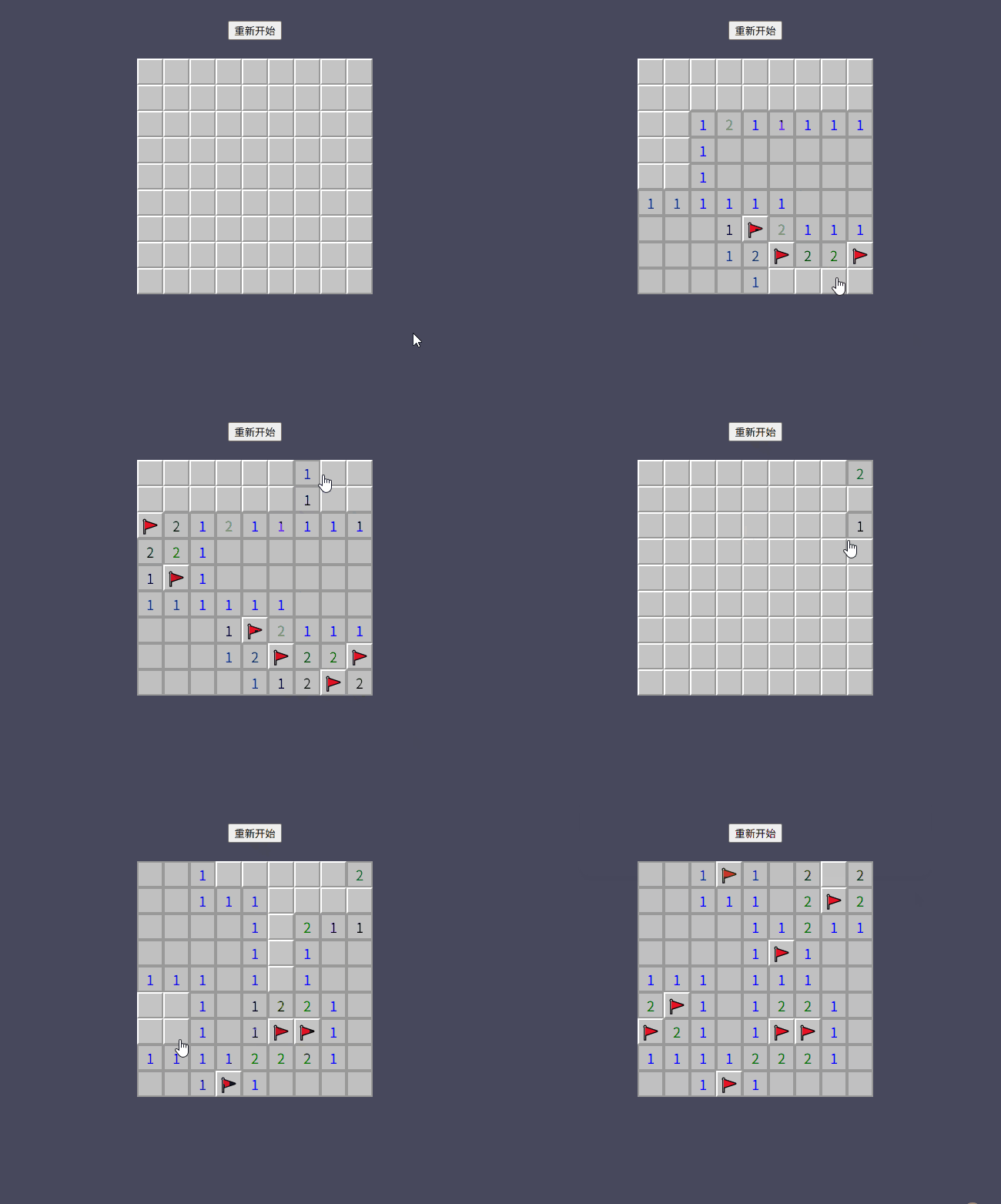
vue相关代码比较简单,我们只需要new一个封装的扫雷类将得到的board.list二维数组进行渲染即可。通过格子的不同状态和数值展示不同样式模拟点击和标记操作。完整代码如下:
<script lang="ts" setup>
import { ref, computed } from 'vue';
import { MineSweeper } from './mine';

const game = new MineSweeper(9);

const mineList = computed(() => {
  return game.boardList
})

const cellClass = computed(() => {
  return (cell) => {
    return {
      'cell-mine': cell.isRevealed && cell.value === -1,
      'cell-flag': !cell.isRevealed && cell.isFlagged,
      'cell-empty': cell.isRevealed && cell.value === 0,
      ['cell-number-' + cell.value]: cell.isRevealed && cell.value > 0,
    }
  }
})
</script>

<template>
  <div class="mine-sweeper">
    <div class="top">
      <div class="opts">
        <button @click="game.resetGame">重新开始</button>
      </div>
    </div>
    <div class="board">
      <div
        class="row"
        v-for="(row, y) in mineList"
        :key="y"
      >
        <div
          v-for="(cell, x) in row"
          :key="x"
          class="cell"
          :class="cellClass(cell)"
          :data-value="cell.value"
          @click="game.revealCell(x, y)"
          @contextmenu.prevent="game.flagCell(x, y)"
        >
        </div>
      </div>
    </div>
  </div>
</template>

<style lang="scss">
.mine-sweeper {
  height: 100vh;
  background-color: #47485C;
  .opts {
    display: flex;
    align-items: center;
    padding-top: 32px;
    justify-content: center;
  }
  .board {
    margin: 0 auto;
    padding: 24px;
    width: fit-content;
    .row {
      display: flex;
      .cell {
        display: flex;
        align-items: center;
        justify-content: center;
        width: 30px;
        height: 30px;
        font-size: 18px;
        cursor: pointer;
        background: #c4c4c4;
        border: 2px solid;
        border-color: white #999 #999 white;
        &-empty {
          cursor: pointer;
          pointer-events: none;
          background: #c0c0c0;
          border: 2px solid #999;
        }
        &-number-1, &-number-2, &-number-3, &-number-4, &-number-5, &-number-6, &-number-7, &-number-8 {
          color: blue;
          background: #c0c0c0;
          cursor: pointer;
          pointer-events: none;
          border: 2px solid #999;
          &::after {
            content: attr(data-value);
          }
        }
        &-number-2 {
          color: green;
        }
        &-number-3 {
          color: yellow;
        }
        &-number-4 {
          color: orange;
        }
        &-number-5 {
          color: red;
        }
        &-number-6 {
          color: purple;
        }
        &-number-7 {
          color: pink;
        }
        &-number-8 {
          color: brown;
        }
        &-flag {
          &::after {
            content: '🚩';
          }
        }
        &-mine {
          background: red;
          cursor: pointer;
          pointer-events: none;
          border: 2px solid #999;
          &::after {
            content: '💣';
          }
        }
      }
    }
  }
}
</style>
1
2
3
4
5
6
7
8
9
10
11
12
13
14
15
16
17
18
19
20
21
22
23
24
25
26
27
28
29
30
31
32
33
34
35
36
37
38
39
40
41
42
43
44
45
46
47
48
49
50
51
52
53
54
55
56
57
58
59
60
61
62
63
64
65
66
67
68
69
70
71
72
73
74
75
76
77
78
79
80
81
82
83
84
85
86
87
88
89
90
91
92
93
94
95
96
97
98
99
100
101
102
103
104
105
106
107
108
109
110
111
112
113
114
115
116
117
118
119
120
121
122
123
124
125
126
127
128
129
130
131
132
133
2
3
4
5
6
7
8
9
10
11
12
13
14
15
16
17
18
19
20
21
22
23
24
25
26
27
28
29
30
31
32
33
34
35
36
37
38
39
40
41
42
43
44
45
46
47
48
49
50
51
52
53
54
55
56
57
58
59
60
61
62
63
64
65
66
67
68
69
70
71
72
73
74
75
76
77
78
79
80
81
82
83
84
85
86
87
88
89
90
91
92
93
94
95
96
97
98
99
100
101
102
103
104
105
106
107
108
109
110
111
112
113
114
115
116
117
118
119
120
121
122
123
124
125
126
127
128
129
130
131
132
133
上次更新: 2025/09/05, 8:09:00