
 高德地图infoWindow信息窗中使用vue页面
# 引入高德地图
具体申请key的流程这里不涉及,不会请看教程
<script type="text/javascript" src="https://webapi.amap.com/maps?v=1.4.15&key=您申请的key"></script>
1
# 基础使用
var map = new AMap.Map("container",{
		resizeEnable:true,
		center: [116.481181, 39.989792],
		zoom: 16
	});

	var marker = new AMap.Marker({
		map:map,
		position: [116.481181, 39.989792]//点所在位置
	});
	//创建信息窗体
	var infoWindow = new AMap.InfoWindow({
		content:"infoWindow "//信息窗体的内容
		offset: new AMap.Pixel(0, -30) // 偏移距离
	});

	// 点击事件触发
	AMap.event.addListener(marker, 'click', function(){
		infoWindow.open(map, mark.getPosition());
	});
1
2
3
4
5
6
7
8
9
10
11
12
13
14
15
16
17
18
19
20
21
2
3
4
5
6
7
8
9
10
11
12
13
14
15
16
17
18
19
20
21
infoWindow的content可以是String/HTMLElement两种,在vue中提供一个特性:$el,通过它我们可以获取到当前vue实例或组件的dom数据,我们将$el设置到content上就可以得到一个vue控制的信息窗


实现代码如下: App.vue
<template>
  <div id="app">
		<!-- 检验vue的动态绑定 -->
		<input type="text"v-model="msg" />
		<!-- 地图 -->
		<div id="container" style="height: 500px; width: 500px;"></div>
		<!-- 信息窗$el提供组件 -->
		<hello-world :msg="msg" ref="helloWord"></hello-world>
  </div>
</template>

<script>
import HelloWorld from './components/HelloWorld.vue'

export default {
  name: 'app',
  components: {
    HelloWorld
  },
  data() {
	  return {
		  msg: '123'
	  }
  },
	mounted() {
		let map = new AMap.Map("container",{
			resizeEnable:true,
			center: [116.481181, 39.989792],
			zoom: 16
		});

		let marker = new AMap.Marker({
			map:map,
			position: [116.481181, 39.989792]//点所在位置
		});

		//创建信息窗体
		let infoWindow = new AMap.InfoWindow({
			// content:"infoWindow-固定内容 ",//信息窗体的内容
			offset: new AMap.Pixel(0, -30), // 偏移距离
			closeWhenClickMap: true,
			isCustom: true
		});

		// 点击事件触发
		AMap.event.addListener(marker, 'click', () => {
			infoWindow.setContent(this.$refs.helloWord.$el);
			infoWindow.open(map, marker.getPosition());
		});
	}
}
</script>

<style>
#app {
  font-family: 'Avenir', Helvetica, Arial, sans-serif;
  -webkit-font-smoothing: antialiased;
  -moz-osx-font-smoothing: grayscale;
  /* text-align: center; */
  color: #2c3e50;
  margin-top: 60px;
}
</style>
1
2
3
4
5
6
7
8
9
10
11
12
13
14
15
16
17
18
19
20
21
22
23
24
25
26
27
28
29
30
31
32
33
34
35
36
37
38
39
40
41
42
43
44
45
46
47
48
49
50
51
52
53
54
55
56
57
58
59
60
61
62
63
64
2
3
4
5
6
7
8
9
10
11
12
13
14
15
16
17
18
19
20
21
22
23
24
25
26
27
28
29
30
31
32
33
34
35
36
37
38
39
40
41
42
43
44
45
46
47
48
49
50
51
52
53
54
55
56
57
58
59
60
61
62
63
64
HelloWorld.vue
<template>
  <div class="hello">
    <h1>{{ msg }}</h1>
    <p>
     vue 和 infoWindow
    </p>
  </div>
</template>

<script>
export default {
  name: 'HelloWorld',
  props: {
    msg: String
  },


}
</script>


<style scoped>
.hello {
	width: 200px;
	height: 200px;
	background: #FFFFFF;
}
</style>
1
2
3
4
5
6
7
8
9
10
11
12
13
14
15
16
17
18
19
20
21
22
23
24
25
26
27
28
29
2
3
4
5
6
7
8
9
10
11
12
13
14
15
16
17
18
19
20
21
22
23
24
25
26
27
28
29
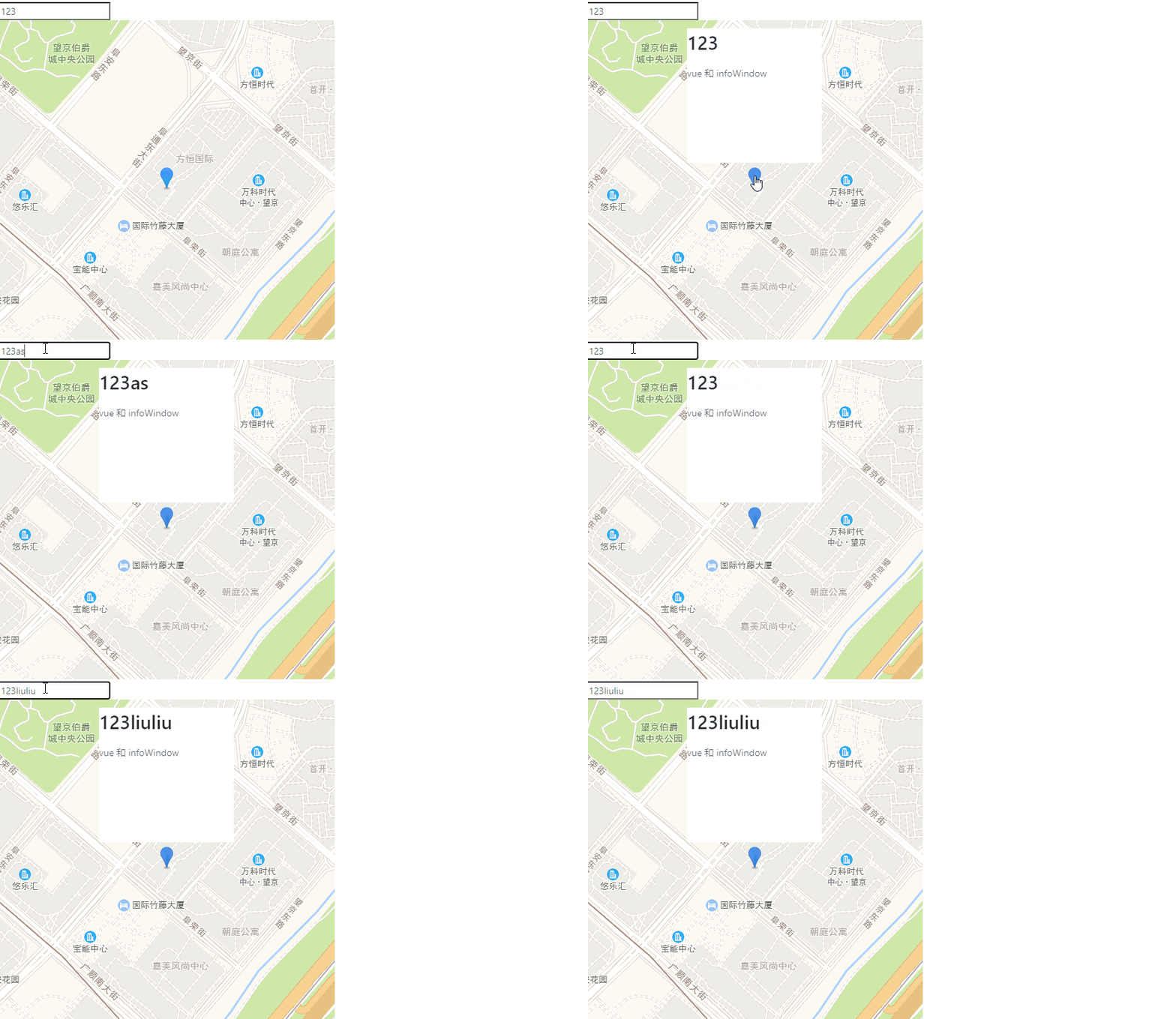
效果如下:
上次更新: 2025/09/05, 8:09:00